Find unused and wasted Microsoft 365 licences
Licence waste usually sits in four places, and the first three are quick to find:
- Licences still assigned to blocked accounts, often leavers.
- Paid licences that were bought but never assigned.
- Licences on accounts nobody has signed in to for months.
- People on a bigger plan than they use: someone on Business Standard who never opens the desktop Office apps, or someone on Office 365 E3 who only uses email.
Put a monthly price on each and the total is usually the easiest part of a client review to act on.
By hand, for one tenant #
With the Microsoft Graph PowerShell module:
Connect-MgGraph -Scopes "User.Read.All", "Organization.Read.All", "AuditLog.Read.All"

# 1. Licences on accounts that can't sign in
Get-MgUser -All -Filter "accountEnabled eq false" -Property UserPrincipalName, AssignedLicenses |
    Where-Object { $_.AssignedLicenses.Count -gt 0 } |
    Select-Object UserPrincipalName, @{ Name = "Licences"; Expression = { $_.AssignedLicenses.Count } }

# 2. Bought but not assigned
Get-MgSubscribedSku | Select-Object SkuPartNumber,
    @{ Name = "Bought"; Expression = { $_.PrepaidUnits.Enabled } }, ConsumedUnits,
    @{ Name = "Spare"; Expression = { $_.PrepaidUnits.Enabled - $_.ConsumedUnits } }

# 3. Last sign-in of every licensed account (needs Entra ID P1)
Get-MgUser -All -Property UserPrincipalName, AssignedLicenses, SignInActivity |
    Where-Object { $_.AssignedLicenses.Count -gt 0 } |
    Select-Object UserPrincipalName,
        @{ Name = "LastSignIn"; Expression = { $_.SignInActivity.LastSignInDateTime } }
Licences come back as part numbers rather than names (SPB is Microsoft 365 Business Premium,
ENTERPRISEPACK is Office 365 E3), so keep Microsoft's product names list to hand.
For the fourth kind, the Microsoft 365 admin centre's Reports → Usage pages show who used each service and the desktop Office apps in the last 30, 90 or 180 days. If people show up as long codes instead of names, untick Display concealed user, group, and site names in all reports under Settings → Org settings → Services → Reports.
Every client, every night #
Office Sentry costs the waste at the monthly prices you enter for each licence, so the figure is in money, for one client or all of them.
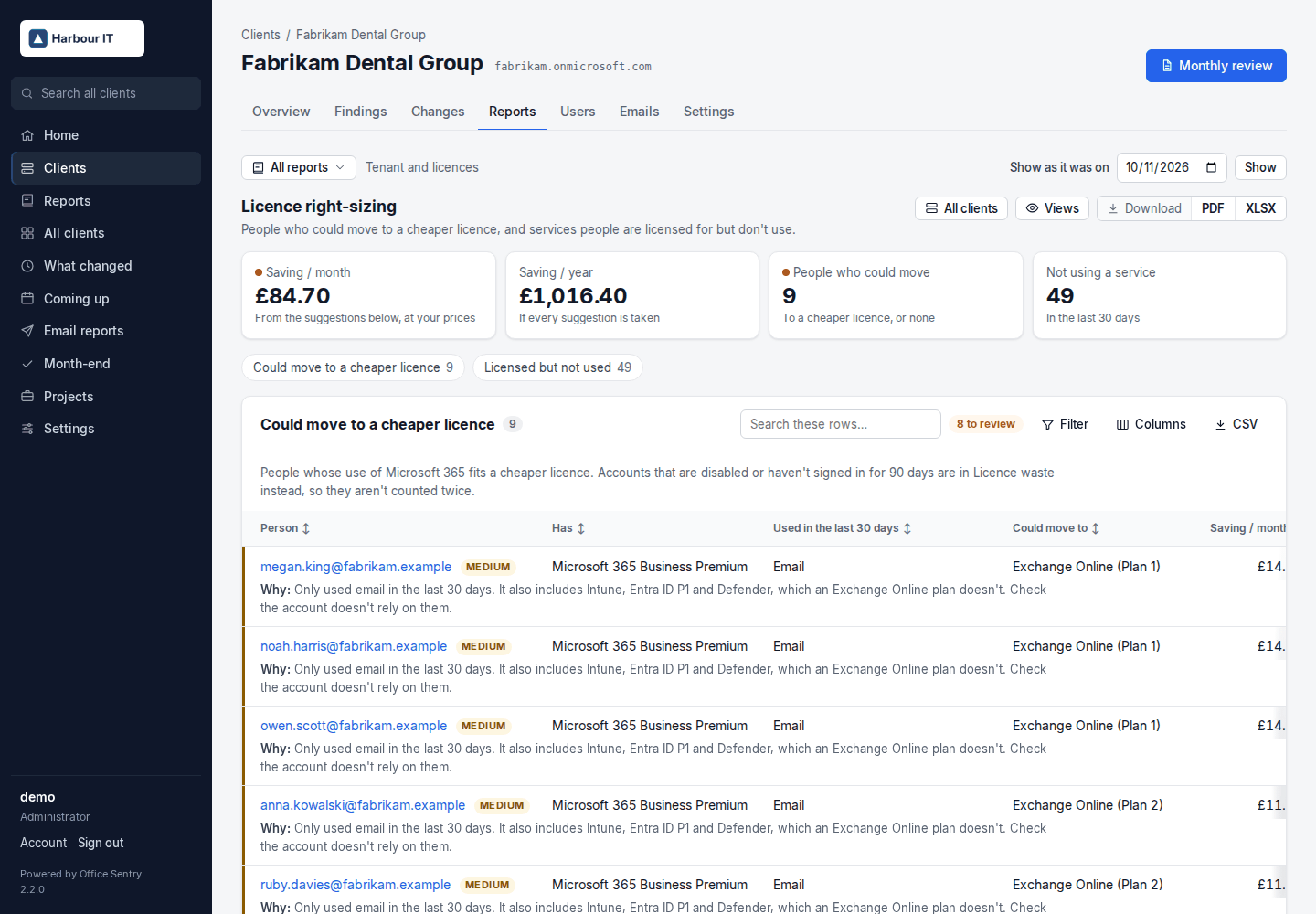
- Licence waste lists licences on disabled and inactive accounts and paid licences nobody is assigned, with the monthly cost. The monthly review leads with that figure.
- Licence right-sizing lists people who could move to a cheaper licence and the saving: nothing used in 30 days, only email used, no desktop Office apps used, Copilot unused.
- Licences and subscriptions shows every subscription with its renewal date, trials about to end and group licensing errors in plain words, and Licence changes shows who was given or lost a licence each month, and by whom.
- All clients puts the waste for every client side by side, largest first.
Open Licence waste in the demo · Example PDF · Install Office Sentry