Find mail forwarding to outside addresses in Microsoft 365
On this page
Forwarding to an outside address is how a lot of business email compromise carries on after a password reset: an attacker who got into a mailbox adds a rule that quietly copies mail elsewhere. It's also how a leaver keeps receiving company mail at home. Forwarding hides in three places, so check all three: the mailbox's own forwarding setting, inbox rules, and the tenant settings that decide whether outside forwarding works at all.
By hand, for one tenant #
Connect with the Exchange Online PowerShell module (Install-Module ExchangeOnlineManagement). Global Reader
is enough for everything below.
Connect-ExchangeOnline
1. Forwarding set on the mailbox #
Get-Mailbox -ResultSize Unlimited |
    Where-Object { $_.ForwardingSmtpAddress -or $_.ForwardingAddress } |
    Select-Object UserPrincipalName, ForwardingSmtpAddress, ForwardingAddress, DeliverToMailboxAndForward
ForwardingSmtpAddress is usually the outside address itself. ForwardingAddress points at a mailbox or
mail contact in the directory, and a mail contact may be outside too. Compare the addresses with the
tenant's own domains (Get-AcceptedDomain).
2. Inbox rules that forward or redirect #
Get-Mailbox -ResultSize Unlimited | ForEach-Object {
    Get-InboxRule -Mailbox $_.UserPrincipalName |
        Where-Object { $_.ForwardTo -or $_.ForwardAsAttachmentTo -or $_.RedirectTo } |
        Select-Object MailboxOwnerId, Name, Enabled, ForwardTo, ForwardAsAttachmentTo, RedirectTo
}
This reads one mailbox at a time, so it takes a while on a big tenant. While you're there, look for rules that delete mail or move it to a folder nobody reads, often with a name like "." or "..": attackers use them to hide replies from the person they're impersonating.
3. Whether outside forwarding works at all #
Exchange Online blocks automatic forwarding to outside addresses by default, through the outbound spam filter policy. A remote domain can block it too, and the stricter of the two wins.
Get-HostedOutboundSpamFilterPolicy | Select-Object Name, AutoForwardingMode
Get-RemoteDomain | Select-Object DomainName, AutoForwardEnabled
AutoForwardingMode Off blocks it, On allows it, and Automatic (the default) means blocked.
If a policy is On, check which mailboxes it applies to. Mail flow rules (Get-TransportRule) can also
redirect mail, so glance at those.
Every client, every night #
Office Sentry's Mail forwarding report lists every forward, set by an admin or by an inbox rule, outside addresses first, with the outbound spam policies and remote domains that allow or block it.
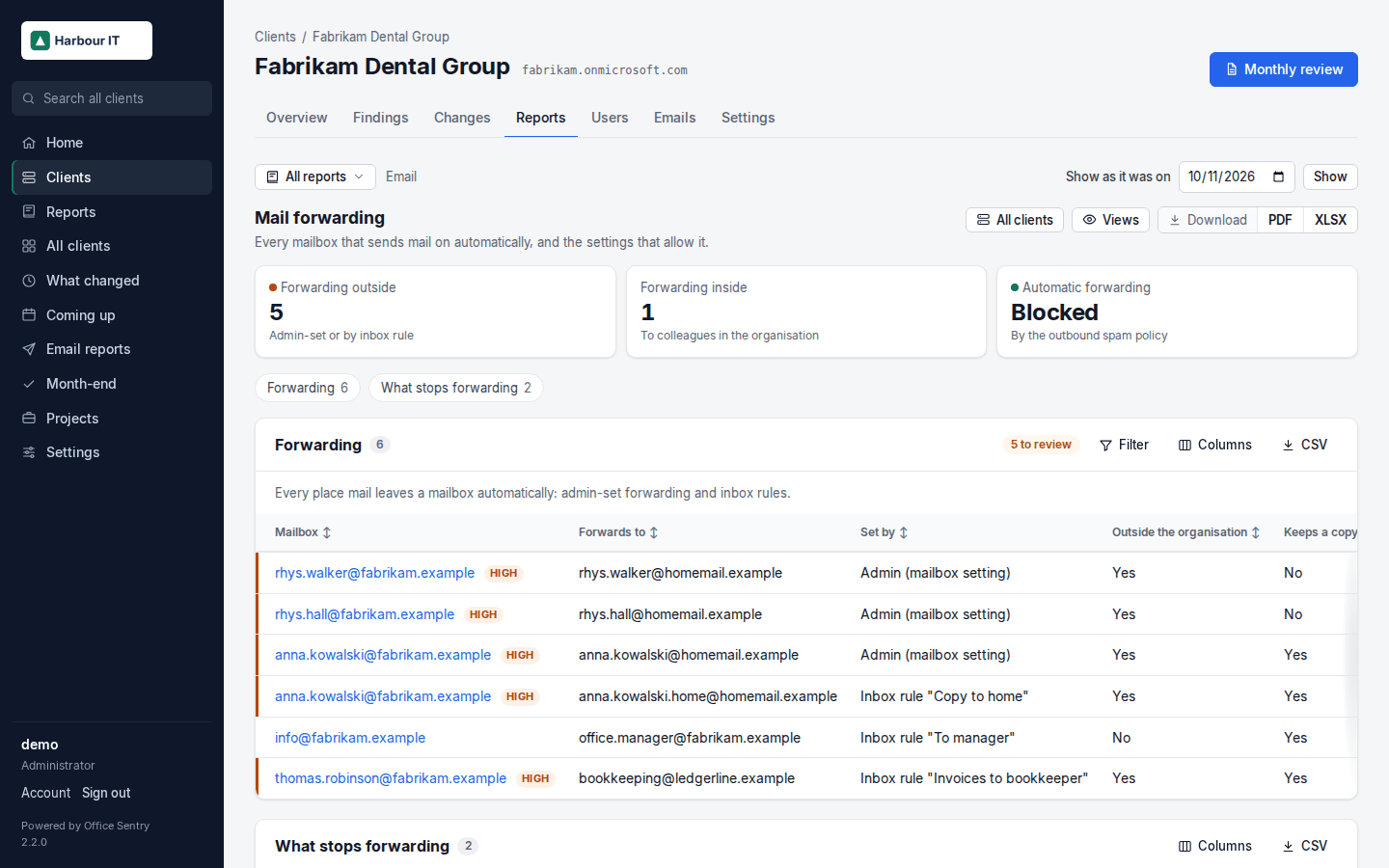
- Inbox rules lists rules that forward outside, delete or hide mail, and every rule in every mailbox.
- Checks fail on mail forwarded outside the organisation and on automatic forwarding being allowed, so they appear in the client's monthly review with what to do.
- What changed shows a new forward the day after it appears, for every client at once, and an alert can email you or post to Teams or Slack when a new high-severity finding turns up.
Open Mail forwarding in the demo · Example PDF · Every check · Install Office Sentry