MFA status report for every Microsoft 365 client
On this page
An MFA report worth sending answers two questions, not one: who has set up MFA, and who is made to use it. Microsoft's registration report only answers the first. Someone with the Authenticator app registered, but no Conditional Access policy or Security Defaults asking for it, can still sign in with a password alone. So can anyone a policy excludes. The accounts that matter are where the two lists disagree, admins first.
By hand, for one tenant #
Who has registered #
In the Microsoft Entra admin centre, Authentication methods → User registration details lists every account with whether it's MFA capable and which methods it has registered. The same list from PowerShell, with the Microsoft Graph module (the tenant needs Entra ID P1 or P2, which Business Premium and E3 include):
Connect-MgGraph -Scopes "AuditLog.Read.All"
Get-MgReportAuthenticationMethodUserRegistrationDetail -All |
    Select-Object UserPrincipalName, IsAdmin, IsMfaRegistered, IsMfaCapable,
        @{ Name = "Methods"; Expression = { $_.MethodsRegistered -join ", " } } |
    Export-Csv mfa-registration.csv -NoTypeInformation
Who is made to use it #
That depends on how the tenant enforces MFA, and a tenant can use more than one way:
- Security Defaults (Entra admin centre → Overview → Properties → Manage security defaults). Everyone must register; admins are asked for MFA at every sign-in and other people when Microsoft decides it's needed.
- Conditional Access (Protection → Conditional Access). Open each policy that grants access with Require multifactor authentication or an authentication strength, and note who it includes and excludes, which apps it covers, and whether it's On or only Report-only. Group exclusions have to be expanded to the people in them.
- Per-user MFA, the older setting (Users → All users → Per-user MFA).
Then line the two lists up. Look first for admins without a strong method, people a policy excludes, people no policy covers, and accounts that never registered.
Every client, every night #
Office Sentry's MFA coverage report makes that comparison for every client each night: who has set up MFA, who Conditional Access or Security Defaults requires to use it, and where the two don't match.
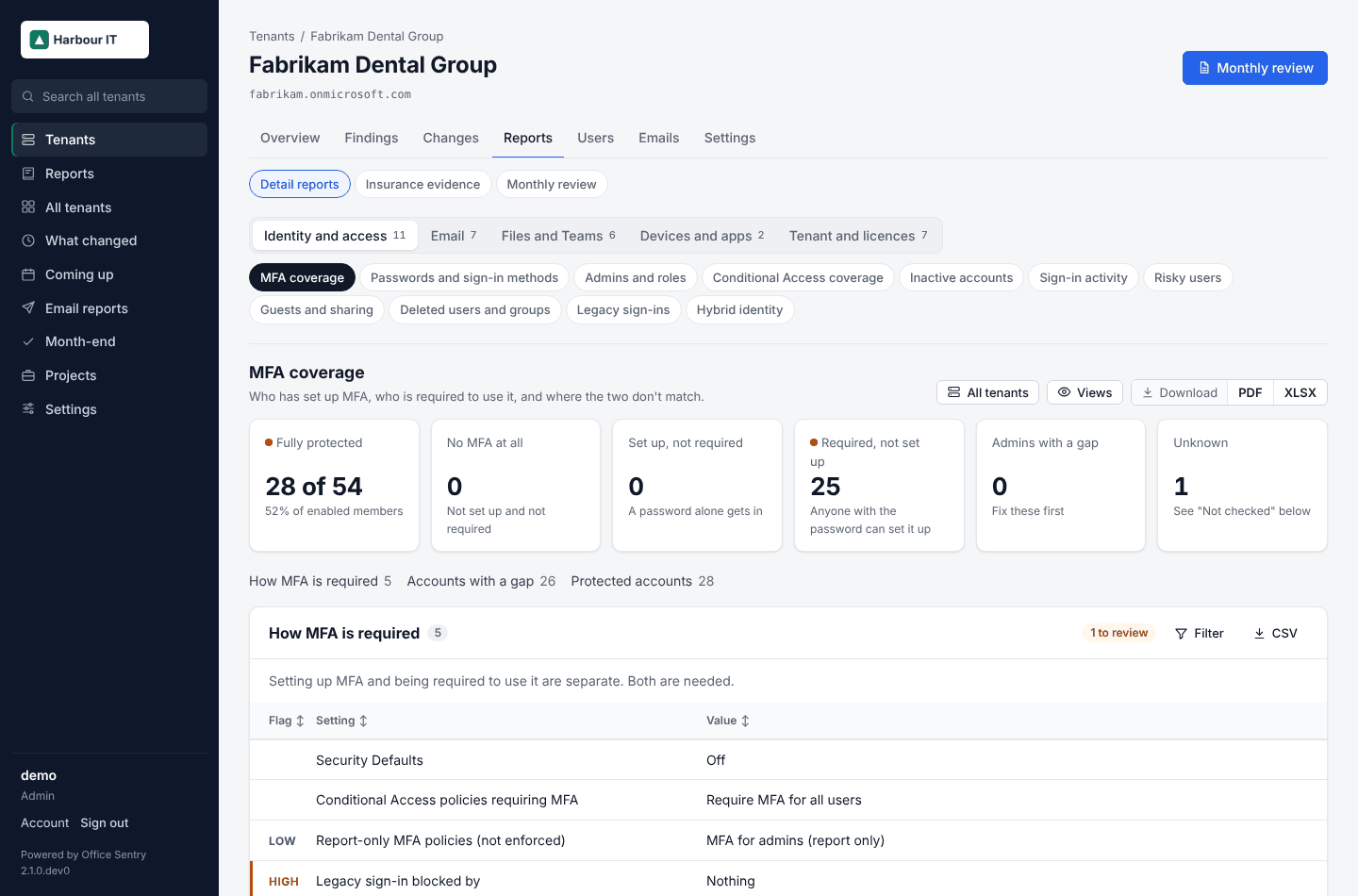
- All clients puts every client's MFA figures side by side, worst first, and every figure opens the accounts behind it.
- Each figure carries its change over four weeks, so the monthly review can say "MFA up from 81% to 94%".
- Conditional Access coverage shows each policy in plain words and, for each person, which policy requires MFA and which ones exclude them, with groups expanded.
- Passwords and sign-in methods goes further: who has a phishing-resistant method, and who relies on a text message or call.
- Checks fail on users without MFA, admins without MFA, admins no MFA policy covers and MFA that isn't enforced, and the failures land in the client's monthly review with what to do about them.
Open MFA coverage in the demo · Example PDF · Every check · Install Office Sentry