Cyber Essentials evidence from Microsoft 365
Cyber Essentials, the UK scheme run by the NCSC and IASME, asks about five control themes: firewalls, secure configuration, security update management, user access control and malware protection. For a client whose work lives in Microsoft 365, much of the evidence is already in the tenant: who has MFA on cloud services, whether admin accounts are kept separate, and which devices are managed, encrypted and on a supported version of Windows. The rest, such as firewalls, routers, patch timing and software from other vendors, Microsoft 365 can't show, so you answer it from those systems.
This page follows the current requirements (v3.3) and IASME's question set for assessments bought from 27 April 2026 (Danzell).
What Microsoft 365 can answer #
| Theme | What to check in Microsoft 365 | Where |
|---|---|---|
| User access control | Every user and admin is asked for MFA on Microsoft 365. Admin roles sit on separate accounts, not the ones people use every day. Leavers' accounts are disabled. | Entra admin centre: Conditional Access or Security Defaults, Roles and administrators, Users |
| Security update management | Every computer runs a version of Windows that Microsoft still supports. | Intune: Devices → Windows, by OS version |
| Secure configuration | Devices meet a compliance policy, and how people sign in. | Intune compliance, Entra Authentication methods |
| Malware protection | Managed devices meet a compliance policy that requires anti-malware. | Intune compliance policies |
| Firewalls | Not part of Microsoft 365. | The firewall itself |
Two things catch people out. MFA has to cover every user of every cloud service, not just admins, and an account a Conditional Access policy excludes counts as a gap. And Cyber Essentials Plus tests this directly: the assessor signs in from a browser the tenant has never seen and expects an MFA prompt.
By hand #
- MFA: list who has registered and who a policy requires to use it, then fix every gap. The MFA status report page has the PowerShell.
- Admins: in the Entra admin centre, open Roles and administrators and check that each admin role is held by a separate admin account.
- Devices: in Intune, check every Windows device's version against Microsoft's support dates, and look at the encryption and compliance reports.
- The rest: firewall rules, router passwords, patching within 14 days, software from other vendors and anti-malware settings come from those systems, not from Microsoft 365.
Then type each answer into the IASME portal and have a director sign it off.
Every client, judged from the data #
Office Sentry's Cyber Essentials and Cyber Essentials Plus pages judge each control from the client's own data as an assessor would: any gap is a Fail.
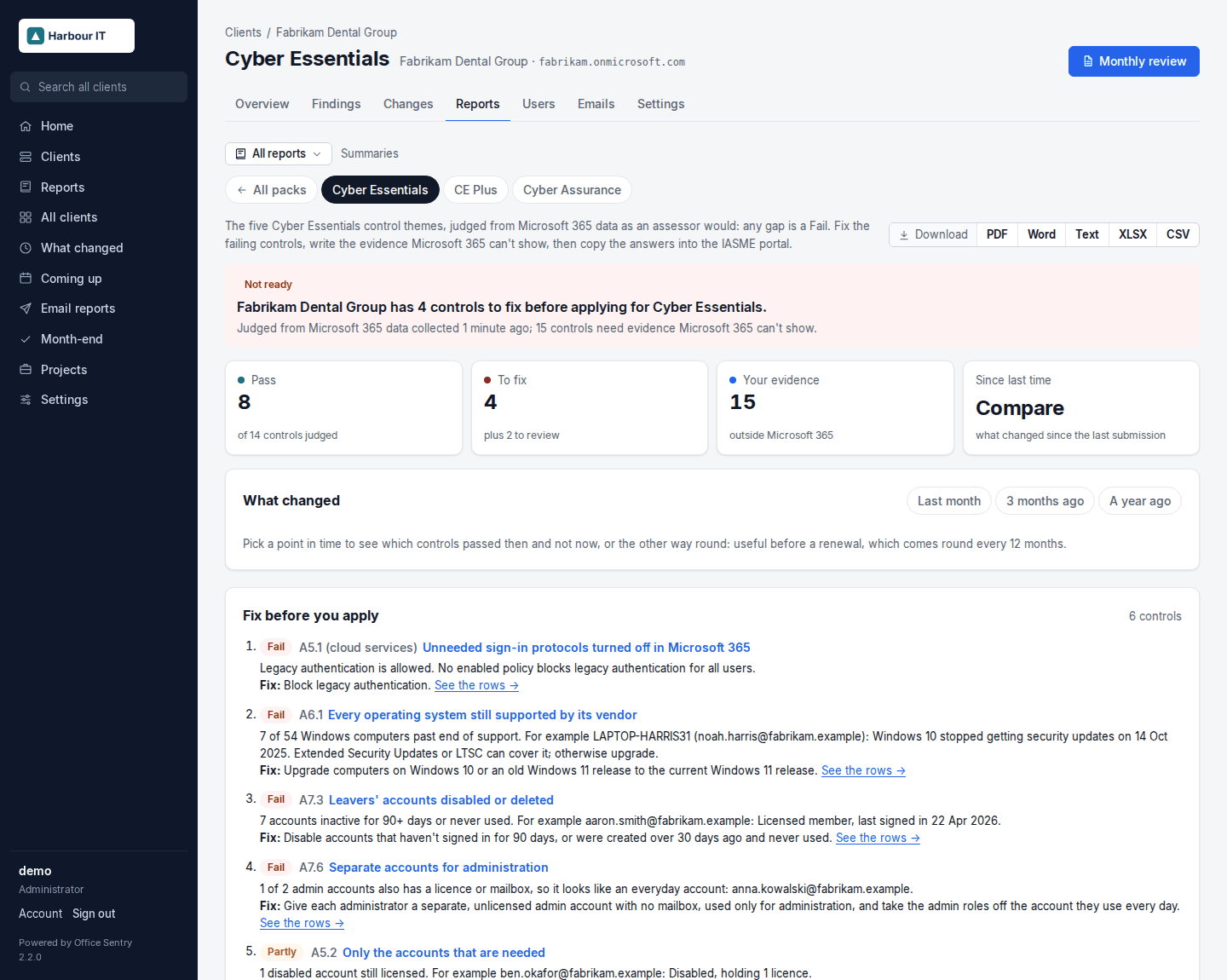
- Every control is Pass, Fail, Partly or Your evidence, with the figures behind it, the fix, and text to paste. What Microsoft 365 can't show is marked as yours to answer, with a text to complete.
- The answers for the IASME portal come by question number, ready to copy.
- For CE Plus, each of the assessor's tests says what Office Sentry can see and what to have ready.
- "What changed since" a date shows the fixes made before applying, and the whole thing downloads as a PDF or Word document for the client.
- The same data also answers cyber-insurance proposals and supplier questionnaires, and IASME Cyber Assurance, ISO 27001, UK GDPR, the CIS Microsoft 365 benchmark, NIST CSF 2.0, SOC 2 and the Essential Eight.
Office Sentry gives you the evidence; it doesn't certify anyone. The assessment, and the sign-off, stay with the client and their certification body.
Open Cyber Essentials in the demo · Example PDF · Install Office Sentry